Your first 30 minutes — and your first 100 recommendations.
From installation to your first bill, step by step: what you see, what you do, what happens next — and which benefit becomes visible where. You can stop, pause, or uninstall at any point.
- Step 1
Install — the three approvals
- What you see
- The Shopify permission dialog with four read-only scopes: orders from the last 60 days, customers (consent state and email address only), products, and product listings. extra carts requests no write permissions.
- What you do
- Confirm three things: the permissions, your plan (you start on the Free plan — $0, where you can never be charged), and the data processing agreement.
- What happens next
- Setup is complete. You do not need to write emails or define customer groups, and you do not need technical help.
Visible from now on: Without your later, active switch to the Fair plan, no bill can structurally ever exist.
Nothing is sent yet, and nothing in your store is changed.
- Step 2
The first 30 minutes — see what the app finds
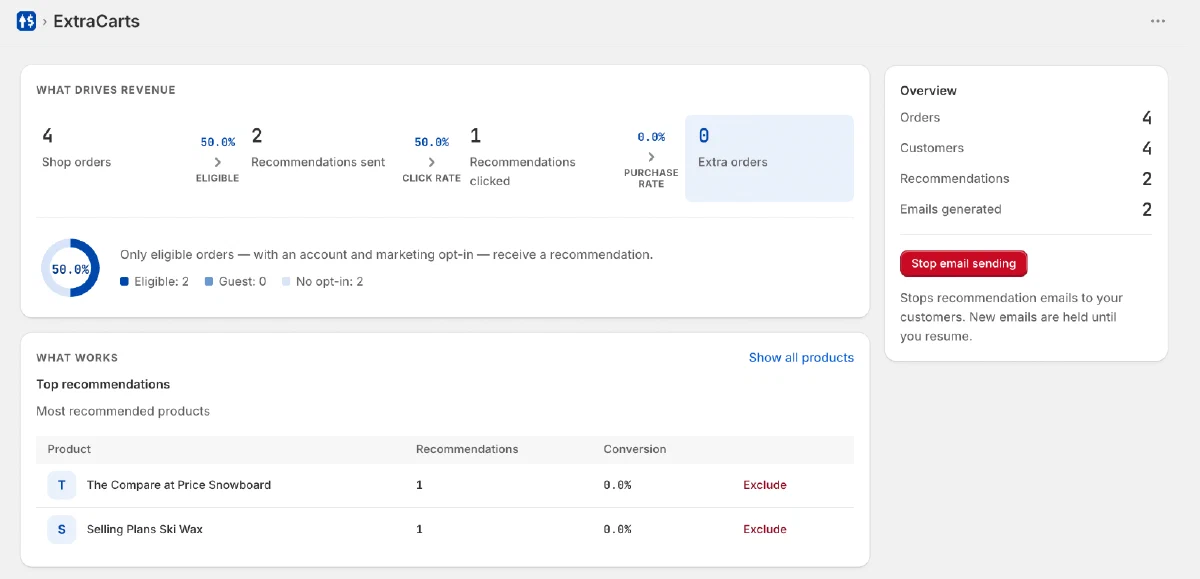
- What you see
- In the dashboard, you see the app analyze your orders: average order value, possible fees and products frequently bought together. It then checks consent and product similarity under UWG §7(3) for every potential recipient.
- What you do
- Watch. Nothing else — at the bottom of this page you can follow the first 30 minutes step by step.
- What happens next
- After about 30 minutes the first recommendation drafts are ready — as previews, not in the outbox.
Visible from now on: You see what extra carts sees: which patterns live in your orders, and what an extra order would cost you — up front.
Everything in this step is analysis. Sending starts only after your approval in step 3.
- Step 3
Approve the first emails
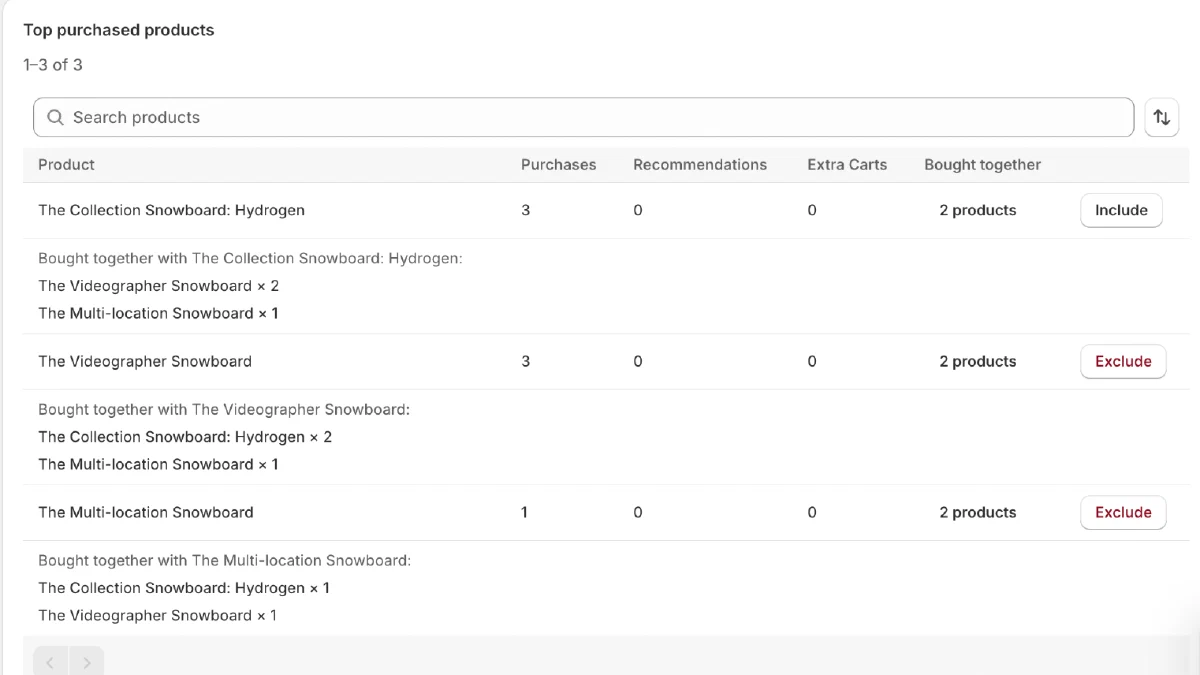
- What you see
- Every planned email as a full preview: recipient count, product pair, subject and copy — plus the reason for exactly this recommendation.
- What you do
- Review and approve. Right here you can exclude individual products or categories and mark pairs as 'never recommend together'.
- What happens next
- Sending begins only now — one hour after the purchase each recommendation complements. During the launch phase a human also reviews every group of planned emails.
Visible from now on: Nothing leaves your shop unseen: you release the first send, not us.
You don't have to (and can't) write the copy — the template is fixed, conservative and compliance-checked; you choose the tone (formal/informal).
- Step 4
The Free plan — 100 recommendations per cycle, then the pause
- What you see
- In the dashboard, you can see which orders came from recommendations and how much additional revenue they generated. Next to that, the counter says, for example: 'Free: 63 of 100 recommendations sent this cycle.'
- What you do
- Nothing. After recommendation 100, sending pauses: further ones queue visibly, with an honest value estimate from your own results — never a countdown, never pressure.
- What happens next
- In the next cycle, the autopilot again sends up to 100 new recommendations. Anything still waiting at the end of this cycle expires unsent; the dashboard shows you how many. If you switch to the Fair plan before then, all waiting recommendations are sent immediately.
Visible from now on: Real results without any billing ever existing — charges begin only when you yourself switch.
The Free plan is not a trial and never expires — you may stay forever.
- Step 5
Your controls — what you can change anytime
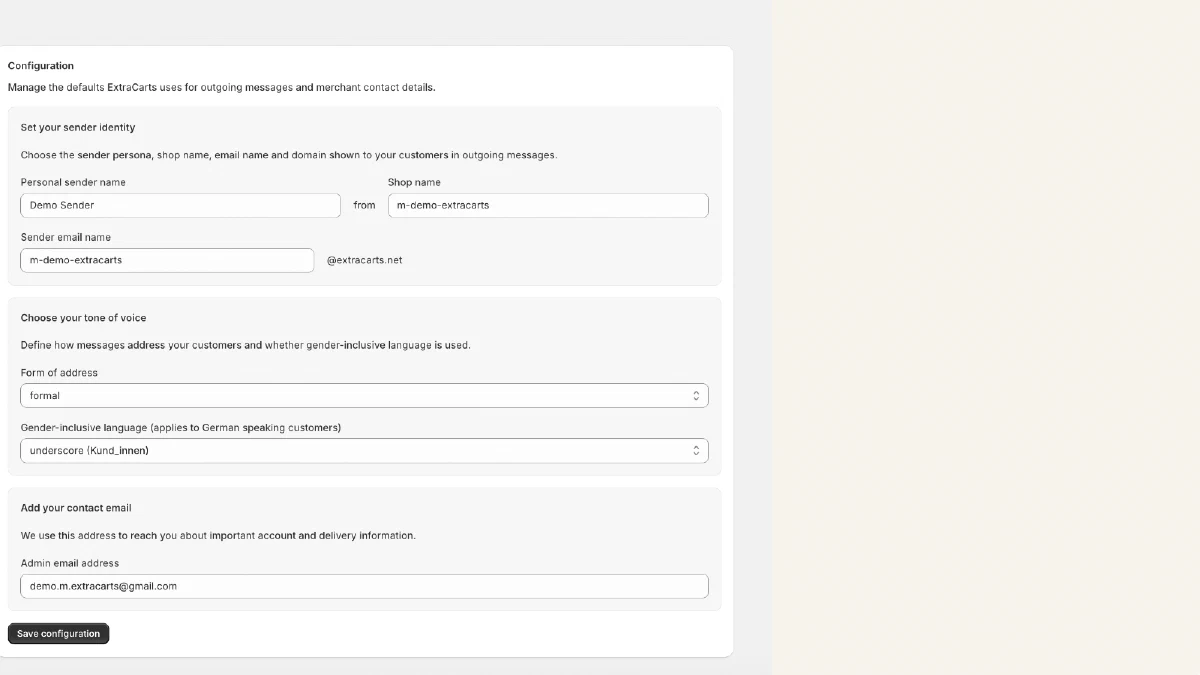
- What you see
- The settings: tone (formal/informal), product and category exclusions, 'never recommend together', frequency (stricter always works), pause — and your plan (Free/Fair, switchable anytime on Shopify's plan page).
- What you do
- Touch only what you want to change — the defaults are deliberately conservative: at most one recommendation every 14 days per customer, never more than four in 90 days.
- What happens next
- Changes apply from the next planned email. Pause stops immediately.
Visible from now on: Control stays with you — pause, exclude, uninstall: anytime, no notice period, no subscription.
- Step 6
Reading your bill
- What you see
- One line per billing cycle on your Shopify invoice. Behind it in the dashboard: the evidence record per order — which email, which click, which timestamp, which order.
- What you do
- Spot-check, or export everything as CSV. Questions about a single record: just write.
- What happens next
- Orders cancelled or fully refunded by cycle end are never billed.
Visible from now on: Every billed euro is traceable. Never billed: anything from the Free plan (even after a switch), cancellations by cycle end — and anything without clean attribution.
- Step 7
Help — a human, not a ticket system
- What you see
- The support contact right in the dashboard. Every email is read and answered by a person, not a ticket system, within 48 hours.
- What you do
- Write whenever anything is unclear — including when a single evidence record looks off to you.
- What happens next
- If an end customer asks about the emails: a STOP reply ends them immediately and permanently — no account, no login.
Visible from now on: You're never left alone with an open question — and neither are your customers.
- Step 8
The honest ending — your feedback
- What you see
- The end of this tutorial — and the only place where we ask something of you.
- What you do
- Tell us if anything felt difficult or wasn't explained well — an informal email is enough.
- What happens next
- Every reply flows straight into this tutorial and the app — read by the founder, like everything else.
Visible from now on: Whatever tripped you up won't trip up the next shop — and your own next cycle gets a better manual.
No survey, no form, no review ask — just one open question.